

From Idea to MS Teams: Deploying an Agent
From Idea to MS Teams: Deploying an Agent
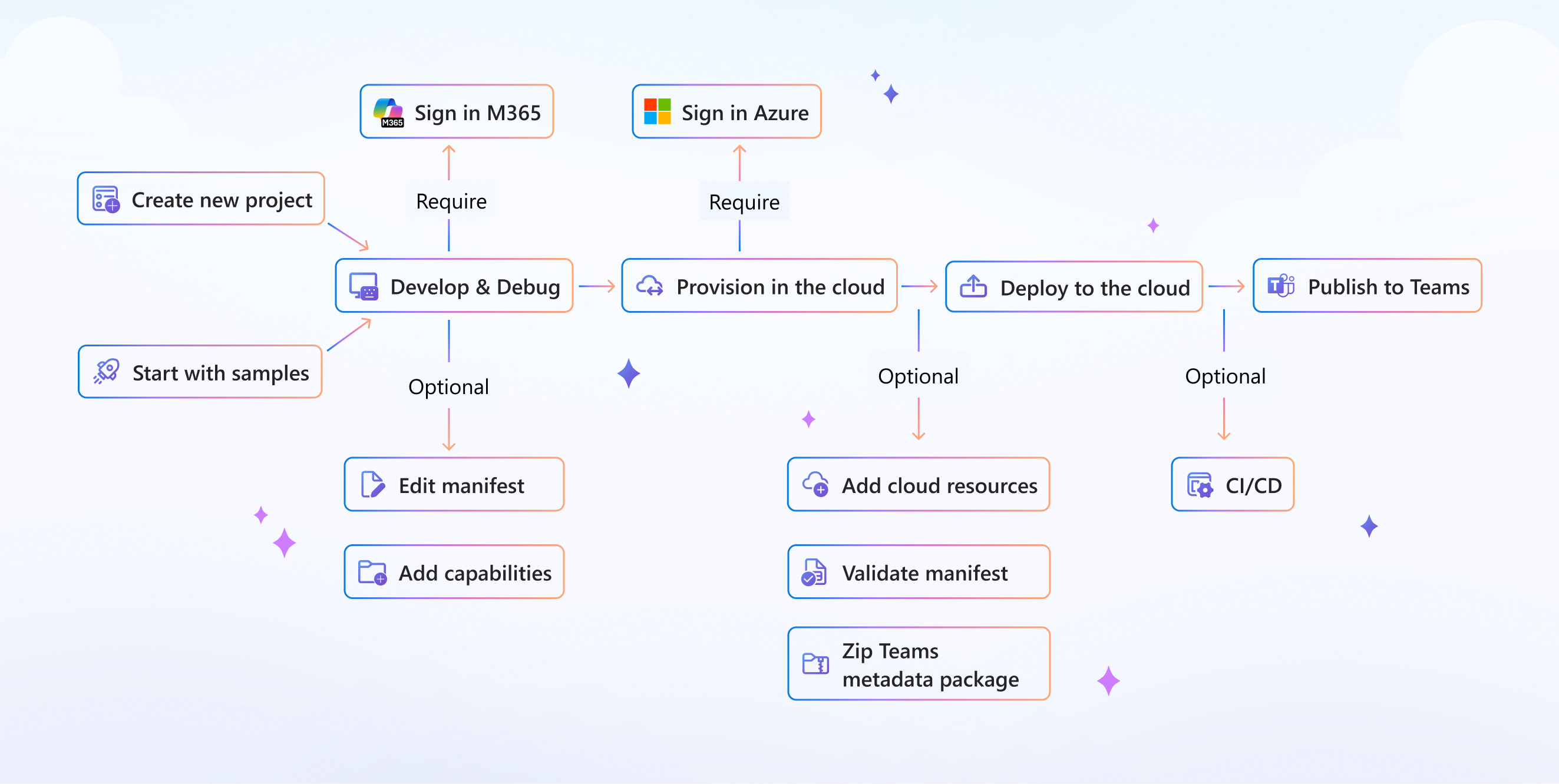 Taken from [1]
There is a growing number of services and entry points to deploy an agent in MS Teams these days. It can be through Copilot, Microsoft 365, or the AI Foundry services. Under the hood, all of them use the Azure Bot Services APIs.
If you want maximum customization, you will like this tutorial.
Prerequisites
If you struggle to get your Azure admin to grant permissions documented in some random blog article, this Microsoft post follows steps similar to this one [1].
- Application Developer role in the Azure subscription where your project will be assigned.
- A corporate MS Teams license. As an alternative, there is a Microsoft 365 Dev trial program you can try, but it only lasts 90 days and you still need an active Azure subscription anyway. It ends up redundant to do all the work there instead of isolating a group of users in your organization's 365 admin console.
Contents
What this tutorial covers:
- Creating the App in Azure Entra ID. This is where permissions are managed, and it is the visible face of your Agent for everyone in the same Microsoft tenant.
- Configuring Azure Bot Services. This is the integration API for the MS 365 suite.
- Integration with your own Agent, a self-hosted LangGraph or whatever you built. Here we see how you connect it to Azure Bot Services.
- Publishing to Teams: user exclusion rules, icons, logos and versioning.
- A few CX details, D:
We are not going to look at the agent's own logic. What you care about, like I did back then, is how to deploy it into your corporate suite.
Entra ID
Azure can be a nightmare sometimes. Let's go step by step.
First, create an app with a name and a 'dev' or 'prd' suffix. You will need this distinction later to segregate users.
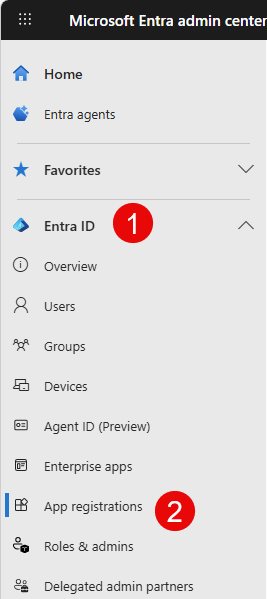 Open the service
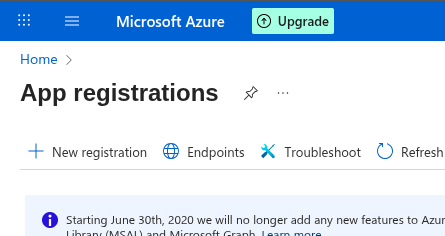 Click create. Single tenant is enough for most use cases.
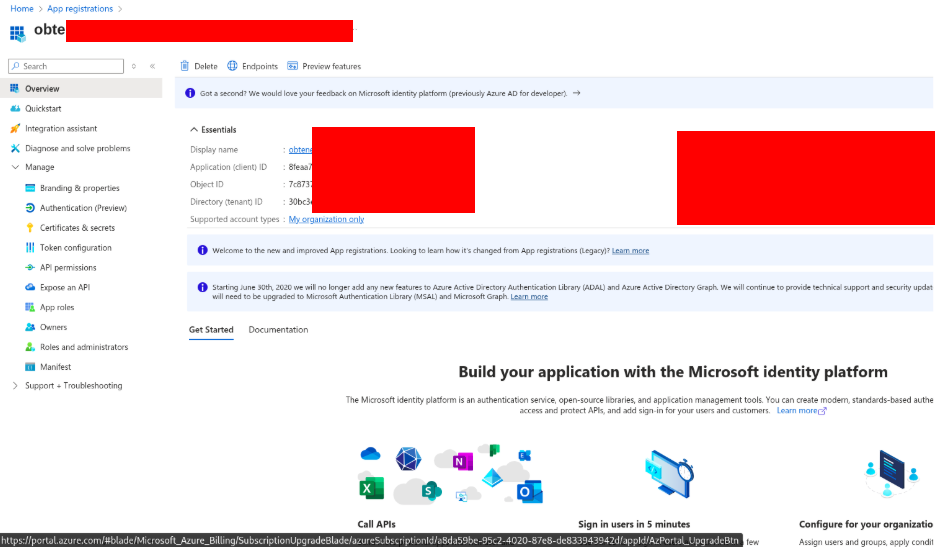 Note down the App Id.
If you need your agent to interact with Microsoft services, the API Permissions section will be your friend. In case your Agent is not part of the Azure ecosystem, a quick fix is to create a certificate in the Certificates and Secrets section. In that case, note down the Secret you generate.
Azure Bot Services
Create a Bot with the same App Id you used for Entra ID. I am not sure of the reason behind this, but when I used the automatically generated Id there were issues with the bot showing up in the Microsoft 365 Admin console.
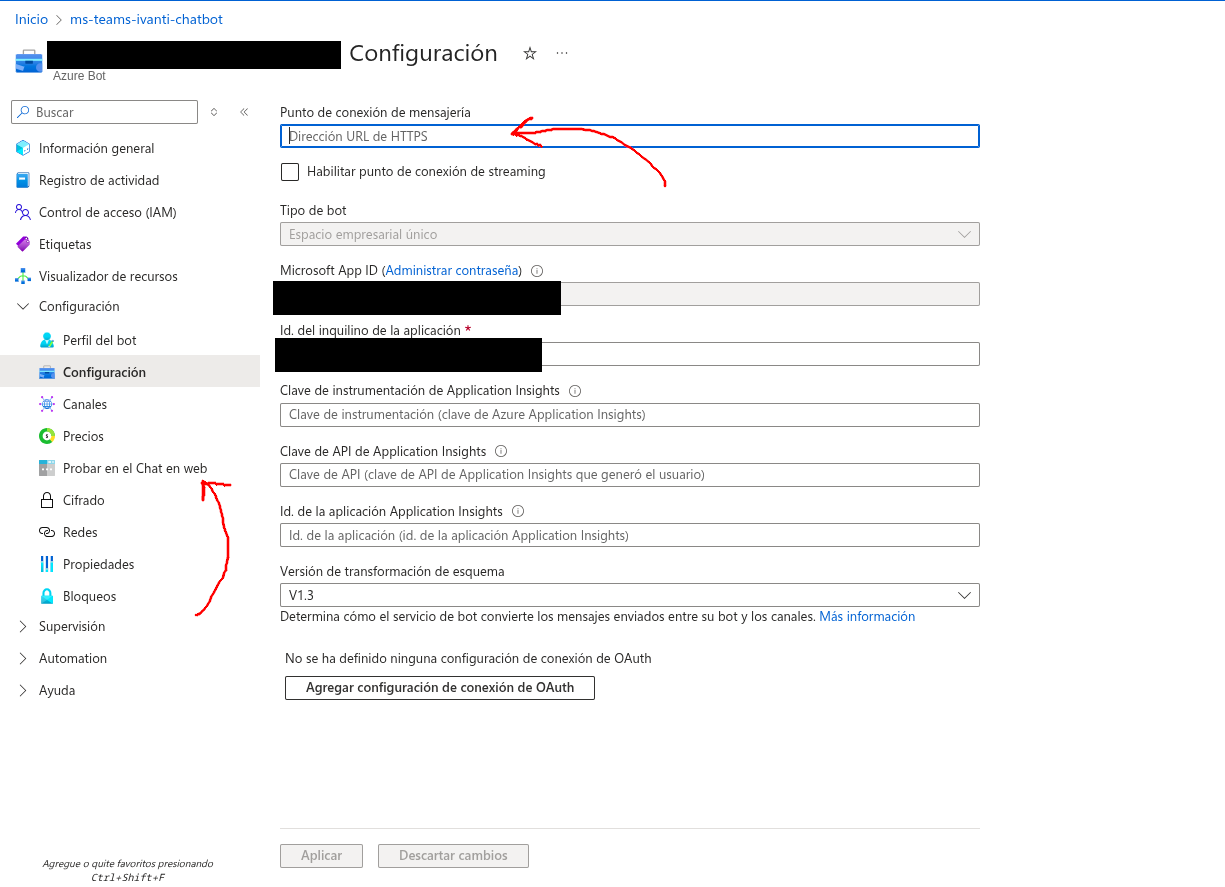 Here the two most important fields have arrows.
The URL endpoint field is the endpoint of the middleware you are going to build next.
The 'test in webchat' section lets you check that your agent and integration middleware actually work and respond correctly.
Integration
- This is a simplified version of an adapter that works for me.
import os
from dotenv import load_dotenv, find_dotenv
load_dotenv(find_dotenv(".prd.env"))

from botbuilder.integration.aiohttp import CloudAdapter, ConfigurationBotFrameworkAuthentication

from src.ext.teams_incoming_adapter import BotInconmingEventsHandler
from src.app.bot_service.service import BotService
from src.ext.session_adapter import SessionStoreAdapter
from src.app.session_watcher_service.service import SessionWatcher

import logging

# Configure logging
logging.basicConfig(
    level=logging.DEBUG,  # Set to DEBUG, INFO, WARNING, ERROR, or CRITICAL
    format='%(asctime)s - %(name)s - %(levelname)s - %(message)s'
)

logger = logging.getLogger(__name__)

PORT = int(os.environ.get("SVC_LISTEN_PORT", "3978"))
APP_ID = os.environ.get("MICROSOFT_APP_ID", "")
APP_PASSWORD = os.environ.get("MICROSOFT_APP_PASSWORD", "")
APP_TYPE = os.environ.get("MICROSOFT_APP_TYPE", "")
APP_TENANTID = os.environ.get("MICROSOFT_APP_TENANT_ID", "")
MAX_IDLE_TIME = int(os.environ.get("SESSION_IDLE_LIMIT_SECS"))  # secs
ALERT_TIME = int(os.environ.get("SESSION_IDLE_WARN_SECS"))

print(f"Configuration loaded. App ID: {APP_ID}, Port: {PORT}")
logger.info(f"✓ App ID: {APP_ID}")
logger.info(f"✓ App Type: {APP_TYPE}")
logger.info(f"✓ Tenant ID: {APP_TENANTID}")
logger.info(f"✓ Password length: {len(APP_PASSWORD) if APP_PASSWORD else 0}")

if not APP_PASSWORD:
    logger.error("❌ MICROSOFT_APP_PASSWORD is EMPTY!")
if not APP_ID:
    logger.error("❌ MICROSOFT_APP_ID is EMPTY!")

class BotConfig:
    PORT = PORT
    APP_TYPE = APP_TYPE
    APP_ID = APP_ID
    APP_PASSWORD = APP_PASSWORD
    APP_TENANTID = APP_TENANTID

config = BotConfig()
# Cloud Adapter is a bot
BOT_CLOUD_ADAPTER = CloudAdapter(ConfigurationBotFrameworkAuthentication(config, logger=logger))


return_last_message_only = os.environ.get("BOT_BACKEND_LAST_MSG_ONLY", "true").strip().lower() in ("1", "true", "yes", "on")
query_url = os.environ.get("BOT_BACKEND_ENDPOINT")
if not query_url:
    raise ValueError("BOT_BACKEND_ENDPOINT is required")

chatbot_adapter = AgentEngineADKAdapter(
    query_url=query_url,
    timeout_seconds=float(os.environ.get("BOT_BACKEND_TIMEOUT_SECS", "60")),
    return_last_message_only=return_last_message_only,
    class_method=os.environ.get("BOT_BACKEND_CLASS_METHOD", "async_stream_query"),
)
logger.info("Agent Engine REST adapter initialized as primary chatbot adapter")

# Plug in whatever session store you use (a database, cache, etc.)
data_store = SessionStoreAdapter(
    connection_string=os.environ.get("DATASTORE_DSN"),
)
logger.info("Session store adapter initialized")

# Plug in whatever feedback storage you use
feedback_repository = FeedbackRepository(
    connection_string=os.environ.get("FEEDBACK_DSN"),
)

feedback_handler = DefaultFeedbackHandler(feedback_repository)

bot_service = BotService(
    chatbot_adapter=chatbot_adapter,
    data_store=data_store,
    fallback_adapter=None,
    bot_adapter=BOT_CLOUD_ADAPTER,
    app_id=APP_ID,
    feedback_handler=feedback_handler,
    alert_idle_seconds=ALERT_TIME,
    close_idle_seconds=MAX_IDLE_TIME,
)

incoming_events_handler = BotInconmingEventsHandler(APP_ID, APP_PASSWORD, bot_service)

http_adapter = HTTPAdapter(BOT_CLOUD_ADAPTER, incoming_events_handler)
app = http_adapter.get_app()

# Start session watcher if data store is available
if data_store is not None:
    try:
        watcher = SessionWatcher(data_store, bot_service, alert_idle_seconds=ALERT_TIME,
                                 close_idle_seconds=MAX_IDLE_TIME)
        watcher.start()
    except Exception as e:
        print(f"Warning: could not start session watcher: {e}")

if __name__ == "__main__":
    from aiohttp import web
    try:
        web.run_app(app, host="0.0.0.0", port=PORT)
    except Exception as error:
        raise error
You can check more implementations in Microsoft's Quickstart [2]. In my opinion the page is a bit abandoned, so don't assume it will work as-is.
- Before wrapping up your integration, do not forget to collect these variables correctly. They are required to decrypt Azure's communication in the production environment.
MicrosoftAppType= SingleTenant
MicrosoftAppId= # client id you just used for entra id and bot services
MicrosoftAppPassword= # client secret
MicrosoftAppTenantId=
The client secret is only needed for integrations outside the Azure ecosystem. It is preferable to use OAuth2 or a secret-free method.
And you also get a nice playground to test your agent even before it lands in Microsoft 365
For it not to fail, you need to leave the variables from step #2 empty. If you don't, the playground won't be able to decrypt the communication. And in my experience, that has been a painful thing to debug when it fails.
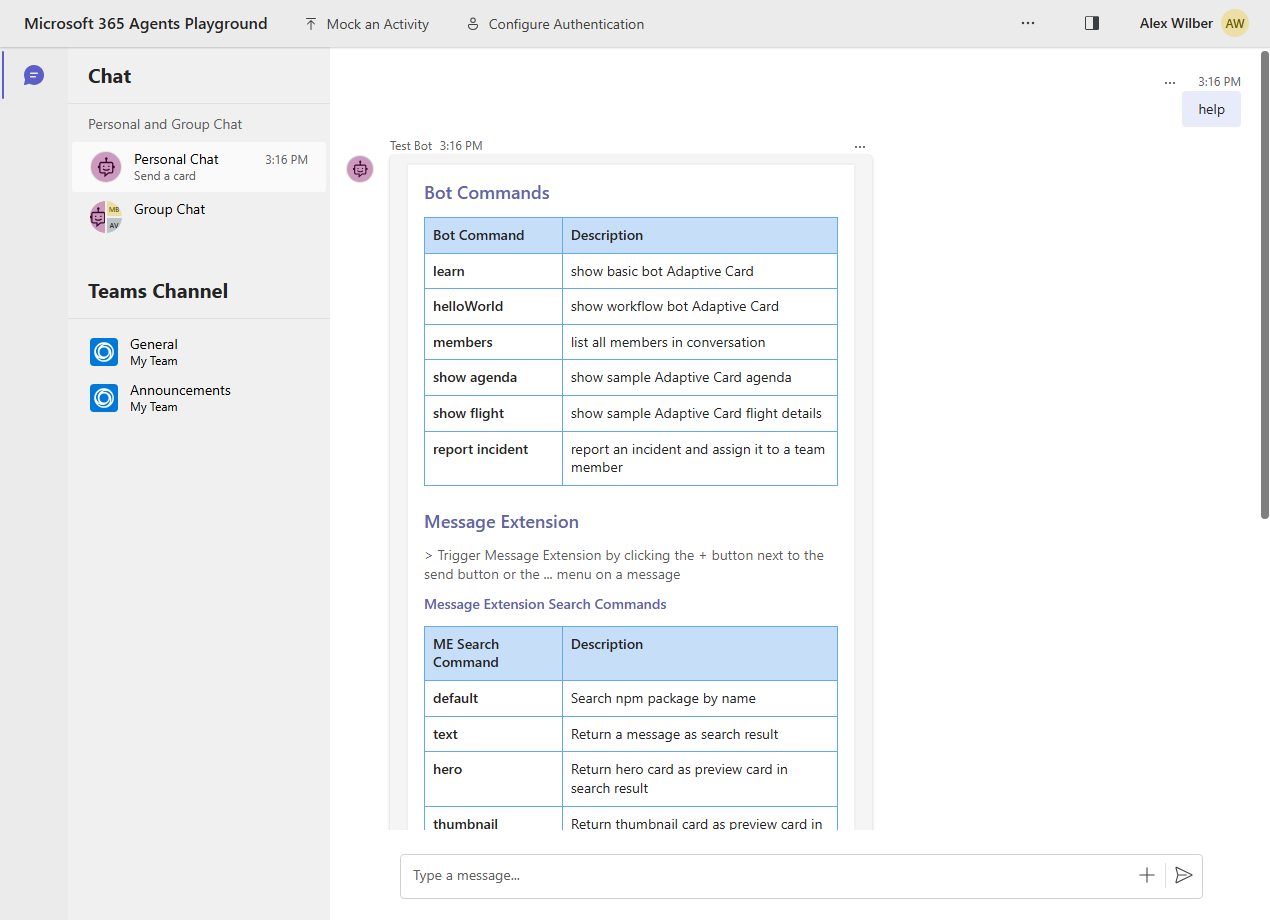 Microsoft 365 Playground
Publishing to Teams
Upload the File Exported from the 365 Toolkit
The project you configured previously generates a bundle. You can customize it with the logo you want displayed. A colored version and a simplified one for sidebars and small icons.
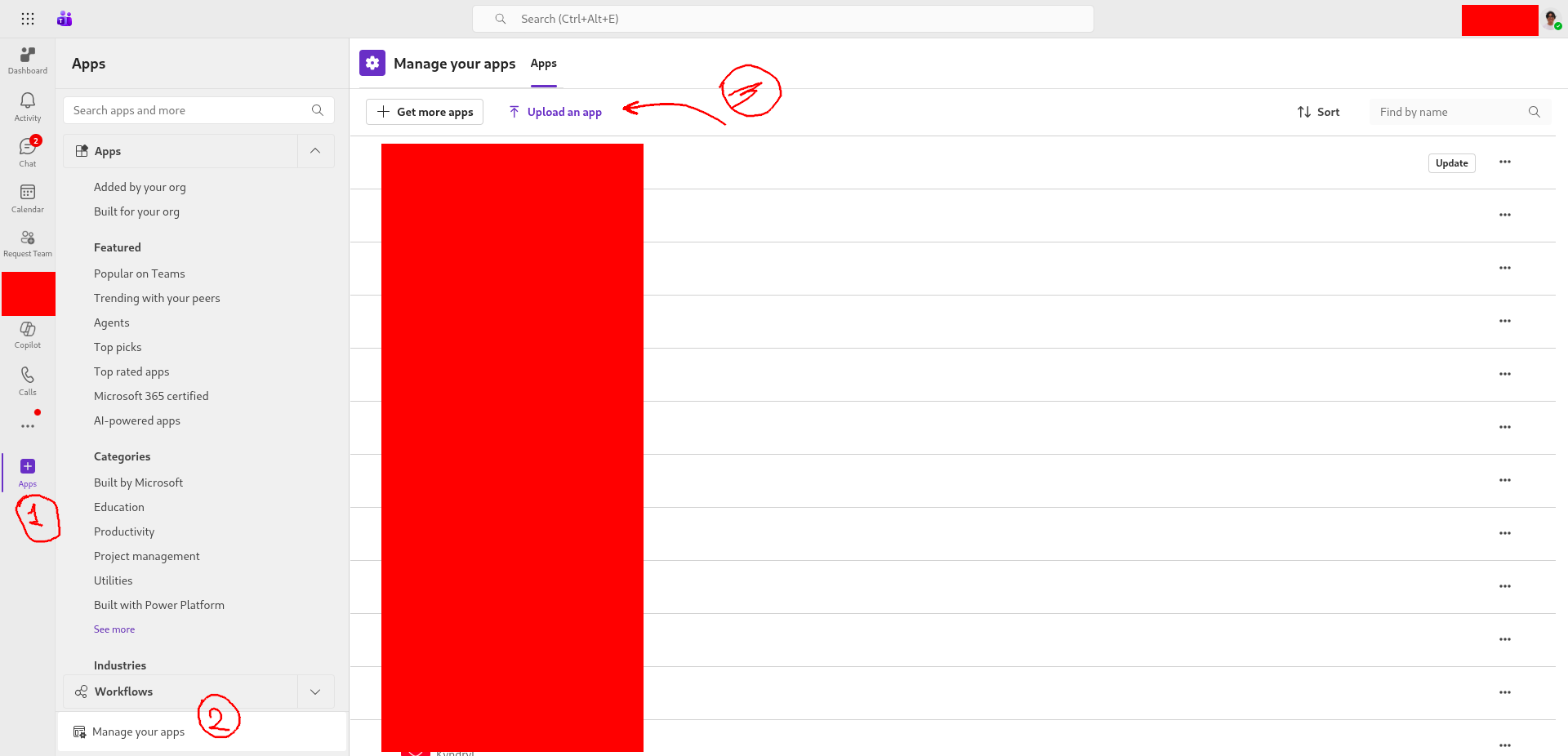 Uploading the bundle exported from the Toolkit
Contact Your MS 365 Administrator
Point them to these links:
I have not been able to share screenshots of what the admin console looks like and the exact steps your admin should follow. But let them know they can create access lists for the application.
Specifically, they should have an access list for the dev application, open only to a handful of tester and developer users. And for the production application, a different strategy can be worked out.
CX!
Interested in using forms with your agent?
Microsoft's good old Adaptive Cards [3]. You can use them in your middleware. Extra customization? It's the same standard used by Power Automate, which you might be more familiar with.
Do you want the ... bot ... to type? ...
# Typying activity: ...
await turn_context.send_activity(Activity(type=ActivityTypes.typing))
# Delegate to application service
response = await self.bot_service.handle_message(text, turn_context)
await turn_context.send_activity(response)
Sending that activity is enough while your agent's engine is working on the response.
Extra!
This is what I could gather from the communications sent by the Azure Bot Services servers. It might be useful if you want to understand how much useful information you can get through the middleware.
POST /api/messages HTTP/1.1
Host: localhost:3978
User-Agent: BF-DirectLine (Microsoft-BotFramework/3.2 +https://botframework.com/ua)
Content-Length: 719
Accept: */*
Authorization: Bearer <REDACTED_JWT>
Channelid: webchat
Content-Type: application/json; charset=utf-8
Request-Id: |<REDACTED_REQUEST_ID>.<REDACTED_SPAN_ID>.
Traceparent: 00-<REDACTED_TRACE_ID>-<REDACTED_SPAN_ID>-00
X-Forwarded-For: xxx.xxx.xxx.xxx
X-Forwarded-Host: xxxx-xxx-xxx-xx.ngrok-free.app
X-Forwarded-Proto: https
X-Ms-Conversation-Id: <REDACTED_CONVERSATION_ID>
Accept-Encoding: gzip

{"type":"typing","id":"<REDACTED_CONVERSATION_ID>|<REDACTED_ACTIVITY_ID>","timestamp":"2026-03-02T17:44:41.6782359Z","localTimestamp":"2026-03-02T12:44:41.391-05:00","localTimezone":"America/Lima","serviceUrl":"https://webchat.botframework.com/","channelId":"webchat","from":{"id":"00000000-0000-0000-0000-000000000000","name":""},"conversation":{"id":"<REDACTED_CONVERSATION_ID>"},"recipient":{"id":"agente-msteams@<REDACTED_TOKEN>","name":"agente-msteams"},"locale":"en-US","entities":[{"type":"ClientCapabilities","requiresBotState":true,"supportsListening":true,"supportsTts":true}],"channelData":{"clientActivityID":"<REDACTED_CLIENT_ACTIVITY_ID>"}}


POST /api/messages HTTP/1.1
Host: localhost:3978
User-Agent: BF-DirectLine (Microsoft-BotFramework/3.2 +https://botframework.com/ua)
Content-Length: 662
Accept: */*
Authorization: Bearer <REDACTED_JWT>
Channelid: webchat
Content-Type: application/json; charset=utf-8
Request-Id: |<REDACTED_REQUEST_ID>.<REDACTED_SPAN_ID>.
Traceparent: 00-<REDACTED_TRACE_ID>-<REDACTED_SPAN_ID>-00
X-Forwarded-For: xxx.xxx.xxx.xxx
X-Forwarded-Host: xxxx-xxx-xxx-xx.ngrok-free.app
X-Forwarded-Proto: https
X-Ms-Conversation-Id: <REDACTED_CONVERSATION_ID>
Accept-Encoding: gzip

{"type":"conversationUpdate","id":"<REDACTED_ACTIVITY_ID>","timestamp":"2026-03-02T17:44:41.0353977Z","serviceUrl":"https://webchat.botframework.com/","channelId":"webchat","from":{"id":"00000000-0000-0000-0000-000000000000"},"conversation":{"id":"<REDACTED_CONVERSATION_ID>"},"recipient":{"id":"agente-msteams@<REDACTED_TOKEN>","name":"agente-msteams"},"membersAdded":[{"id":"agente-msteams@<REDACTED_TOKEN>","name":"agente-msteams"},{"id":"00000000-0000-0000-0000-000000000000"}]}

POST /api/messages HTTP/1.1
Host: localhost:3978
User-Agent: BF-DirectLine (Microsoft-BotFramework/3.2 +https://botframework.com/ua)
Content-Length: 679
Accept: */*
Authorization: Bearer <REDACTED_JWT>
Channelid: webchat
Content-Type: application/json; charset=utf-8
Request-Id: |<REDACTED_REQUEST_ID>.<REDACTED_SPAN_ID>.
Traceparent: 00-<REDACTED_TRACE_ID>-<REDACTED_SPAN_ID>-00
X-Forwarded-For: xxx.xxx.xxx.xxx
X-Forwarded-Host: xxxx-xxx-xxx-xx.ngrok-free.app
X-Forwarded-Proto: https
X-Ms-Conversation-Id: <REDACTED_CONVERSATION_ID>
Accept-Encoding: gzip

{"type":"message","id":"<REDACTED_CONVERSATION_ID>|<REDACTED_ACTIVITY_ID>","timestamp":"2026-03-02T17:44:42.8691754Z","localTimestamp":"2026-03-02T12:44:42.728-05:00","localTimezone":"America/Lima","serviceUrl":"https://webchat.botframework.com/","channelId":"webchat","from":{"id":"00000000-0000-0000-0000-000000000000","name":""},"conversation":{"id":"<REDACTED_CONVERSATION_ID>"},"recipient":{"id":"agente-msteams@<REDACTED_TOKEN>","name":"agente-msteams"},"textFormat":"plain","locale":"en-US","text":"Hola","attachments":[],"channelData":{"attachmentSizes":[],"clientActivityID":"<REDACTED_CLIENT_ACTIVITY_ID>"}}
References
- []{#ref-1}Microsoft. Agents Toolkit fundamentals. Available: https://learn.microsoft.com/en-us/microsoftteams/platform/toolkit/agents-toolkit-fundamentals
- []{#ref-2}Microsoft. Microsoft 365 Agents SDK Quickstart (Python). Available: https://learn.microsoft.com/en-us/microsoft-365/agents-sdk/quickstart?pivots=python
- []{#ref-3}Microsoft. Adaptive Cards. Available: https://adaptivecards.microsoft.com/
- []{#ref-4}Microsoft. Microsoft Teams admin center. Available: https://admin.teams.microsoft.com
- []{#ref-5}Microsoft. Microsoft 365 admin center. Available: https://admin.microsoft.com